
Navy Federal Credit Union
Navy FederalFinance
3.743.19K Reviews
- Version
- 2026.8.1
- Installs
- 10.00M
- Age Rating
- Everyone
Screenshots
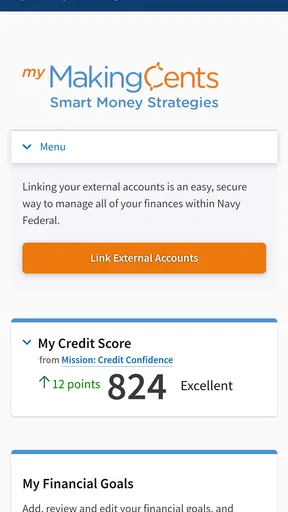
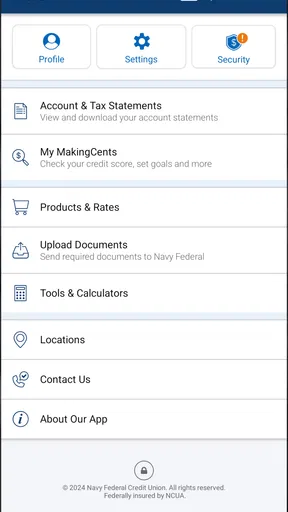
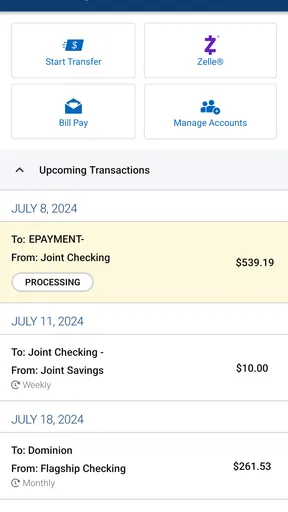
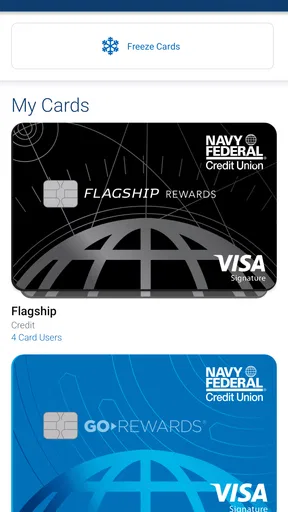
Our Review of Navy Federal Credit Union
 Analysis by Appyee
I came away from Navy Federal Credit Union with a clear impression: this is a practical mobile banking app for people who already belong to Navy Federal and want their everyday money tasks in one place. It is not trying to be a universal personal-finance dashboard or a flashy budgeting experiment. Its value is more direct. I can use it to keep an eye on my accounts, move money, and handle routine banking without reaching for a desktop browser.
That focus is important because the best banking app is usually the one that fits the institution where your money already lives. Navy Federal, the developer, has built this Finance app around its member relationship. The store summary, “Our Members Are the Mission,” captures that orientation, although the useful test is whether the app makes common tasks feel dependable rather than whether the slogan sounds reassuring.
The app is free, available for Everyone, and has reached more than ten million installs. Its average rating is 3.7 from roughly one hundred ten thousand ratings, with about forty-three thousand written reviews. Those figures suggest a widely used service with a mixed but substantial body of user experience behind it. I would read that as a reason to try it if Navy Federal is already your credit union, not as a reason to download it if you have no account there.
What the app does well in everyday banking
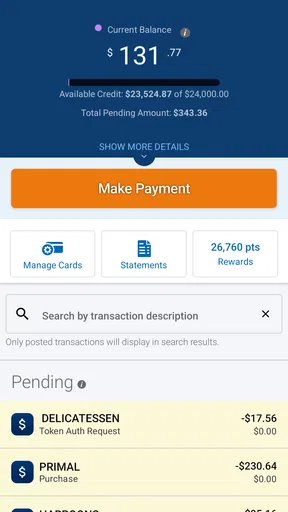
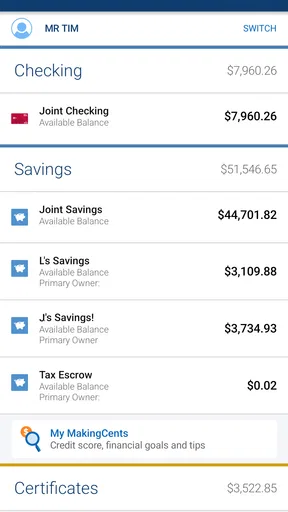
The strongest part of the experience is the convenience of having account information close at hand. When I want to check whether a payment has cleared, see whether a deposit is available, or confirm that a transfer went through, a dedicated credit-union app is more useful than waiting until I am at a computer. That immediacy can prevent small uncertainties from becoming missed payments or accidental overspending.
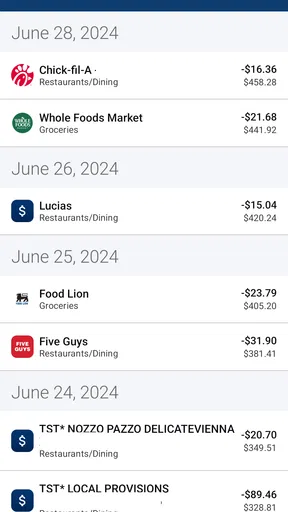
I also like the way a banking app can turn a vague money worry into a quick check. Before buying something expensive, I can review the relevant balance instead of relying on memory. After a purchase, I can look for the transaction and make sure the amount matches what I expected. These are simple actions, but they are exactly where mobile banking earns its place on a phone.
For a Navy Federal member, the app is more sensible than maintaining a separate generic finance app just to watch balances. A third-party tracker may combine several institutions, but it can add another layer between me and the source of the account information. The Navy Federal app keeps the relationship in one place, which is especially useful when I need to distinguish available money from a balance affected by recent activity.
A realistic example is a busy payday. I might open the app in the morning to check the deposit, move money toward a bill, and later verify that a card transaction has posted. None of those moments requires a full financial plan. They require quick access and confidence that I am looking at the right account. That is where this app makes the most convincing case for itself.
Another useful habit is checking the app before making a transfer rather than immediately after. Reviewing the destination account and the amount first helps me avoid sending money from the wrong account, particularly when several accounts have similar names or purposes. The app cannot replace careful attention, but having the information visible makes that attention easier.
Its long history also matters in a modest way. Navy Federal Credit Union was released on July 29, 2011, so this is not a brand-new mobile experiment. The current version is 2026.8.1, which shows that the software continues to receive version updates. I would not treat longevity as proof that every screen is perfect, but it does make the app feel like an established part of the credit union’s service rather than a temporary add-on.
Useful routines beyond simply checking a balance
The most valuable way to use it is as a small control panel for recurring money decisions. I would open it at three different points: before a transfer, after an important transaction, and during a weekly review. Each visit has a different purpose. The first prevents mistakes, the second catches surprises while they are fresh, and the third helps me notice patterns without pretending the app is a full budgeting system.
That distinction is one of my more important takeaways. A banking app can show account activity, but seeing transactions is not the same as planning a month of spending. If I need category rules, long-term charts, or a combined view across unrelated institutions, I may still prefer a dedicated budgeting tool. Navy Federal’s app is strongest when I use it as the authoritative place for Navy Federal account activity, not when I expect it to become my entire financial life.
I would also use it when traveling or shopping away from home, because quick account checks are more convenient than carrying a paper record or waiting for a statement. The sensible approach is to open the app only when needed, verify the transaction details, and avoid making rushed decisions on a public network or while distracted. Convenience helps, but financial security still depends on my own habits.
For households, the app can be useful as a shared reference point when one person handles a payment and another wants to confirm the account activity. It does not remove the need to agree on who is responsible for transfers or bill timing. What it does provide is a current view that can reduce the “I thought you paid it” problem.
The app also has a practical advantage over a browser on a phone: I am more likely to use a dedicated application for a ten-second check than to open a browser, find the correct page, and sign in through a mobile site. That difference sounds minor, but repeated friction changes behavior. If checking is easy, I am more likely to notice an unexpected charge early.
Where the experience can become frustrating
The 3.7 average rating is the clearest reminder that convenience does not mean universal smoothness. A banking app may work well for one person and feel awkward for another depending on device, sign-in habits, account complexity, and the task being attempted. I would not install it expecting every interaction to feel as polished as a leading consumer technology app.
The biggest limitation is the app’s narrow audience. If I do not have a Navy Federal relationship, it has little reason to stay on my phone. Even if I use several banks, this app only solves the Navy Federal portion of my finances. A multi-bank money manager may be better for someone whose main goal is one consolidated picture rather than direct access to a single credit union.
There is also a mental trap in relying too heavily on a balance screen. A displayed balance can be useful without telling me everything I need to know about upcoming obligations, pending activity, or money I have mentally reserved for another purpose. I still need a separate routine for bills and savings goals. The app can support that routine, but it should not be mistaken for a complete financial plan.
Sign-in friction is another trade-off worth accepting only if the security and convenience balance feels right to me. Banking apps must protect sensitive information, and that can make access less casual than opening a weather app. If I am repeatedly locked out, forget credentials, or dislike the authentication flow, the app becomes less useful even when the underlying account service is solid. I would set up the safest available access method carefully and keep recovery details current rather than treating security steps as an annoyance to bypass.
Performance expectations should also be realistic. A finance app depends on account data and service availability, so a slow response or a temporary interruption can matter more than a minor visual flaw. When I need to make an urgent payment, I would not wait until the last possible moment. The app is a helpful channel, but a responsible banking routine includes checking important transactions early enough to deal with problems.
Another weakness is that mobile convenience can encourage constant checking without better decisions. Opening the app repeatedly will not create a budget or fix an overspending pattern. I get more value when I attach it to specific habits: a weekly review, a pre-transfer check, and a confirmation after major activity. That turns the app from a source of anxiety into a useful verification tool.
Who should use it and who should look elsewhere
I would recommend it first to existing Navy Federal members who want direct mobile access to their credit-union accounts. It is particularly suitable for people who check balances often, manage transfers from a phone, or want a quick way to follow account activity while away from a computer. The free price removes the usual barrier to trying it, assuming the person already has the relevant Navy Federal relationship.
It can also suit members who prefer a straightforward banking workflow over a large collection of financial dashboards. Someone who wants to open the app, review an account, handle a routine task, and leave may appreciate its focused role. In my experience, that kind of simplicity is more valuable than a crowded screen full of features I rarely use.
I would be more cautious about recommending it to someone who wants advanced money analysis. If the main requirement is a unified view of accounts at multiple banks, detailed spending categories, investment tracking, or long-term planning tools, a specialized finance app may be the better companion. The choice depends on whether direct Navy Federal access or broad financial aggregation matters more.
I would also skip it as a primary recommendation for a person who is not eligible for or does not use Navy Federal services. A download alone does not make it a general-purpose banking product. Its usefulness comes from the account relationship behind it, so the audience is naturally more specific than the broad Everyone content rating might suggest.
Families and couples should decide in advance how they will use the app. It is good for checking the same account information, but the technology does not settle questions about shared budgets, spending limits, or responsibility for payments. I would combine it with a simple agreement about who reviews activity and when, especially if several people make purchases from connected accounts.
For a first-time mobile banking user, I would begin with low-risk actions: sign in, identify each account, review recent activity, and learn where the main money-management controls are located. Only after that would I attempt a transfer or other important task. This gradual approach is more sensible than exploring while a bill is due, because it gives me time to understand the layout and confirm that access works on my device.
My verdict after weighing convenience against limits
Navy Federal Credit Union succeeds when I judge it as a focused member-banking app rather than as a replacement for every financial tool. Its strongest qualities are access, immediacy, and a direct connection to Navy Federal accounts. The ability to check activity during an ordinary day, verify a deposit, or review a transfer gives it a practical role that I would use regularly.
Its weaknesses are equally clear. The audience is limited to Navy Federal users, the average user response is not flawless, and the app should not be confused with a complete budgeting or financial-planning platform. Some people will want a more polished experience, a broader account view, or deeper analysis. For them, a different option may be a better main tool, with this app kept only for direct account access.
Still, I think the app is worth trying if Navy Federal is where I bank. I would keep expectations grounded, learn the key workflows before an urgent payment is due, and use it alongside—not instead of—a sensible budget. That is the specific recommendation I would give a friend: choose it for dependable day-to-day access to Navy Federal, not for elaborate financial planning.
With its free availability, Everyone rating, established release history, and continued current-version updates, it remains a reasonable mobile companion for members. I would not call it the best finance app for every person, but I would call it a useful one for the people it is actually built to serve. The app earns its place by making ordinary credit-union tasks easier, provided I understand where its focused design stops.
Verdict
Strengths of Navy Federal Credit Union
- No monthly maintenance fees on many checking accounts.
- Strong range of products, including mortgages, loans, and credit cards.,24/7 customer service is useful for urgent banking needs.
- Mobile check deposit makes handling checks quick and convenient.
- Competitive rates may benefit eligible military and veteran members.
Limitations of Navy Federal Credit Union
- Membership is limited to eligible military, veteran, and family groups.
- Some services may require visiting a branch or using shared branches.
- Savings account requirements and rates can vary by product.
- The app may offer fewer budgeting tools than specialized finance apps.
- ATM access is broad, but out-of-network fees may still apply.
Similar Picks in This Category
View All
Google Wallet
Google LLC4.3

Airtel: Recharge, Bank & Loans
Airtel4.0

PayPal - Pay, Send, Save
PayPal Mobile4.2

DANA Indonesia Digital Wallet
PT Espay Debit Indonesia Koe4.5

Binance: Buy Bitcoin & Crypto
Binance Inc.4.8

Cash App
Block, Inc.4.7
Frequently Asked Questions
What is Navy Federal Credit Union, and who can join it?
Navy Federal Credit Union is a member-owned financial institution offering checking and savings accounts, credit cards, loans, mortgages, and other banking services. Membership is generally available to active-duty, retired, and veteran members of the armed forces, certain Department of Defense personnel, and eligible family or household members. Before downloading the app, confirm that you meet the current membership requirements.
What can I do with the Navy Federal mobile banking app?
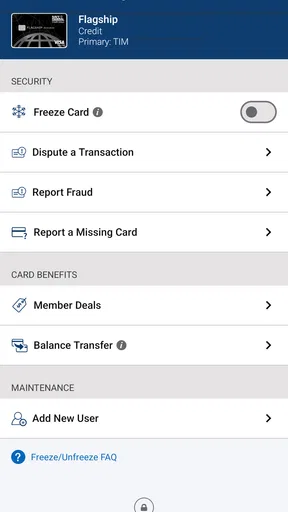
The Navy Federal app lets eligible members manage many everyday banking tasks from an Android or iOS device. Depending on your account and location, you can check balances, review transactions, transfer funds, pay bills, deposit checks using mobile capture, locate branches and ATMs, manage cards, and apply for selected products. Available features may vary, so some services could still require online banking or member support.
Is the Navy Federal app safe for checking accounts and making transactions?
The app is designed with security features intended to protect account access and financial activity, such as login authentication, device security controls, alerts, and safeguards for mobile check deposits and transfers. However, no banking app is completely risk-free. Download it only from the official Google Play Store or Apple App Store, keep your device updated, avoid public Wi-Fi for sensitive actions, and never share verification codes.
Does Navy Federal charge fees for using its mobile banking app?
Downloading and using the Navy Federal mobile banking app is generally not the same as paying a separate app subscription fee. Nevertheless, normal account, transaction, ATM, overdraft, wire, or service charges may apply depending on your account type and the action you perform. Your mobile carrier may also charge data or messaging fees. Review the current fee schedule before completing transactions.
What should I do if I cannot log in or the app is not working?
If the app does not open, loads slowly, or rejects your credentials, first check your internet connection, update the application, and restart your device. Make sure you are using the correct login information and follow the official password-recovery process rather than repeatedly guessing. Avoid unofficial support contacts. If problems continue, use Navy Federal’s official website or contact member service through verified channels.
